
Hardware
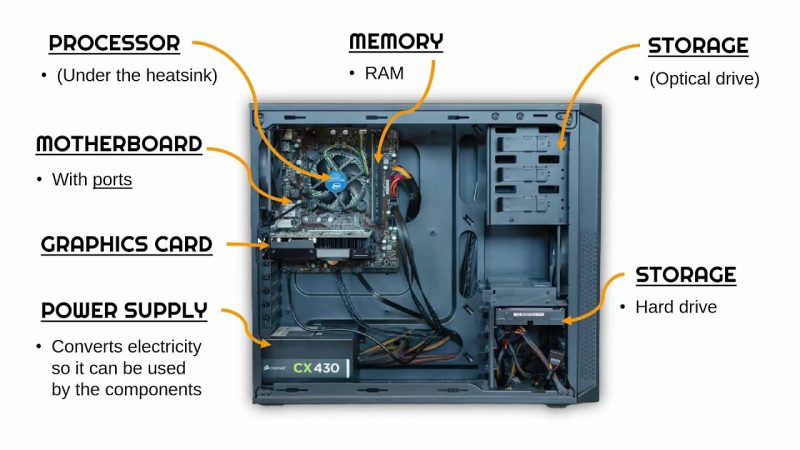
It refers to all the physical, touchable parts of a computer, including both external devices like a keyboard or mouse and internal components such as the CPU, motherboard, RAM, and hard drive.
- External hardware: These are the parts you use to interact with the computer, such as a keyboard, mouse, and monitor.
- Internal hardware: These are the components inside the computer's case. Examples include the Central Processing Unit (CPU), motherboard, Random Access Memory (RAM), graphics card (GPU), and storage drives (like SSDs or HDDs).

Software
Software consists of the programs, procedures, and routines that instruct a computer's hardware to perform tasks. The relationship is interdependent: hardware cannot function without software, and software cannot be stored or executed without hardware. Software is typically categorized into two main types: system software and application software.
System software
System software manages and controls the computer's hardware, providing a platform for application software to run. It operates in the background to handle the computer's core functions.
Examples include:
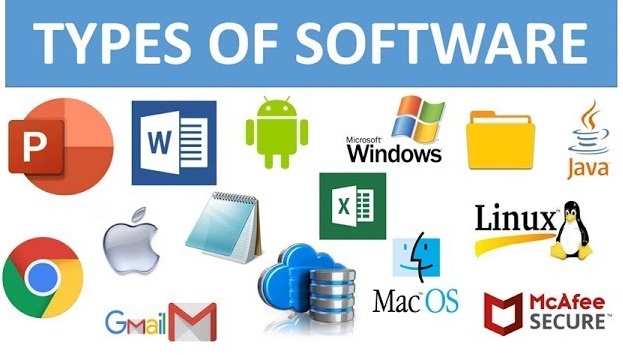
- Operating systems (OS): An OS is the most crucial piece of system software. It manages all the computer's hardware and software resources and provides a user interface. Without an OS, a computer cannot function. Examples are Microsoft Windows, macOS, and Linux.
- Device drivers: These are programs that allow the operating system to communicate with a specific hardware device, such as a printer, mouse, or graphics card.
- Utility software: This helps to analyze, configure, optimize, and maintain the computer. Examples include antivirus software, disk cleanup tools, and backup software.
Application software
Application software (or "apps") is designed for end-users to perform specific tasks. These programs depend on system software to function and are developed for a wide range of purposes, from productivity to entertainment.
Examples include:
- Web browsers: These applications allow you to find, access, and view information on the World Wide Web. Popular examples are Google Chrome, Safari, and Mozilla Firefox.
- Word processors: These are used for composing, editing, formatting, and printing documents. Examples include Microsoft Word, Google Docs, and LibreOffice Writer.
- Games: Computer games use software to create virtual environments and define rules for players.
- Graphics software: Programs like Adobe Photoshop and Canva allow users to create and edit images.
- Productivity software: This category includes office suites, database management tools, and spreadsheet programs like Microsoft Excel.
- Mobile apps: These applications are designed specifically for mobile devices like smartphones and tablets.
Programming software
This type of software provides tools to help developers create, write, test, and debug other software programs.
Examples include:
Integrated Development Environments (IDEs): Applications that combine several developer tools into a single graphical user interface.
Compilers: These programs translate code written in a high-level programming language into machine code that a computer can understand.
Debuggers: Tools used to test and find errors in other software.
In summery- All computer operations rely on the interdependence of physical hardware and digital software. For example, using a mouse (hardware) to click on a web browser (software) is a fundamental action that requires both components to work together. Understanding the differences between various types of computers will involve examining their distinct hardware, and different types of computers also often use different kinds of software to perform their functions.
Hardware
- Definition: The physical parts of a computer that you can see and touch, such as the keyboard, mouse, monitor, and internal components like the CPU and hard drive.
- Function: To provide the physical structure and processing power to run a computer.
Software
- Definition: A set of instructions, data, or programs that tell the hardware what to do and how to do it.
- Function: To guide the hardware and perform specific tasks, such as running a web browser, a word processor, or an operating system.
Interdependebce
- Hardware and software are interdependent and cannot function without each other.
- The software provides the instructions, and the hardware executes them to perform a task, like the hardware running a web browser to display a webpage