
The basic parts of a desktop computer are the Computer case, Monitor, Keyboard and Mouse. Each part plays an important role whenever you use a computer.
Computer case
When it comes to building custom computers, your choice of the computer case will be in determining the performance of your future "dream machine". Your case is where you will store your computer hardware parts, so you will have to consider various factors before making your decision.
Some things to consider:
- Are you building a high-performance gaming system? A small budget system for simple web browsing?
- Will you be placing the system in a tight space, which may require additional cooling/ airflow? Is space not an issue?
- What parts will you be using? More importantly, will your motherboard and/or video card(s) fit?
- What's your price range? Do you care for extra features such as cable management, extra hard drive spaces, etc.?
For this discussion, we will review the 4 main types of PC cases, listed in increasing size: Mini-ITX, Micro-ATX, Mid Tower, and Full Tower.

Computer cases come in different shapes and sizes. A desktop case lies flat on a desk, and the monitor usually sits on top of it. A tower case is tall and sits next to the monitor or on the floor. All-in-one computers come with the internal components built into the monitor, which eliminates the need for a separate case.
Monitor / Screen
A computer monitor is an electronic output device that displays visual information (text, images, video) from a computer, acting as the primary screen for user interaction, functioning like a TV but typically with higher resolution and connected directly to a computer's video card, usually via cables like HDMI or DisplayPort. Modern monitors use flat-panel displays (LCD/LED) and are also known as screens, VDUs (Visual Display Units), or VDUs (Video Display Terminals).

Keyboard
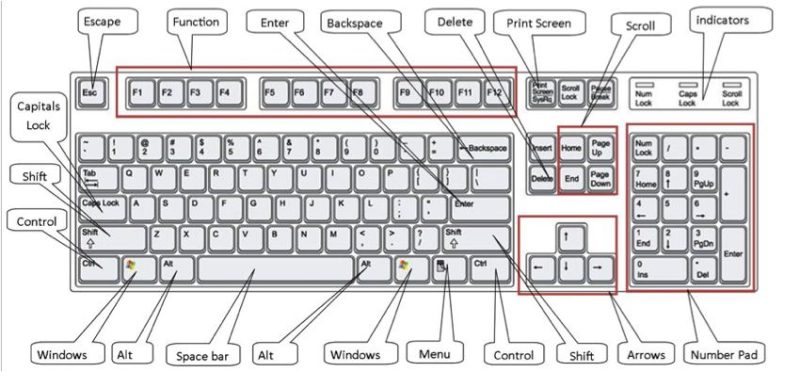
Keyboards are essential input devices for computers and electronic devices, using arranged keys (usually QWERTY) for typing, gaming, and navigation. They connect via USB or wireless (Bluetooth) and range from basic office models to mechanical, ergonomic, and backlit gaming keyboards.

Mouse

A computer mouse is a hand-held hardware input device used to control a cursor within a Graphical User Interface (GUI) by translating2D motion on a flat surface into movement on a display. It facilitates tasks like clicking, dragging, and selecting items, typically featuring at least two buttons and a scroll wheel.

